
Photo to 3D Model in Unity: Import OBJ or GLB
A photo of a real object makes a quick prop, placeholder or collectible for a Unity game. This guide gets the model into your project with its texture, the right way up, with working materials in URP or HDRP, a collider, and a polygon count your target platform can handle.
Try it with your own photo
Free preview, no account. Pay €1 only for the model you keep: OBJ, STL and GLB in one download.
Or open an example model
The short version
- Unzip your OBJify download.
- Drag
model.obj,material.mtland the texture into a folder under Assets, or install glTFast and usemodel.glb. - Drag the model into the scene and stand it upright if needed.
- Pink? Convert the material to your render pipeline.
- Add a collider and, for mobile or many copies, a lighter version.
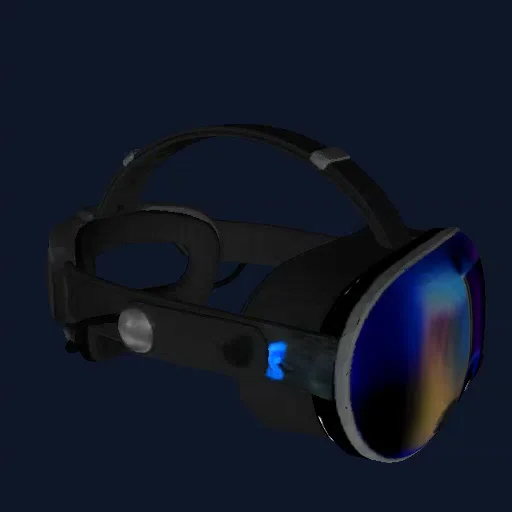
What's in the download
| File in the ZIP | What it is | Use it for |
|---|---|---|
model.glb |
Mesh, colour texture and material in one file. Y-up, about 1 m on its longest side. | Blender, Unreal, Unity (with glTFast), websites, AR |
model.obj + material.mtl + texture image |
Textured mesh, about 1 unit on its longest side, stored Z-up. Keep the three files in the same folder. | Unity, Maya, Cinema 4D, any 3D tool |
model_3dprint_150mm.stl |
Watertight solid, no colour, in millimetres: 150 mm on its longest side, standing on Z = 0. | Slicers, Fusion 360, FreeCAD |
Models are around 55,000–60,000 triangles with a single colour texture (no normal or roughness maps). Files are deleted from our servers after an hour, so keep the ZIP.
1a. Import the OBJ (works out of the box)
- In the Project window, create a folder such as
Assets/Models/Headset. - Drag
model.obj,material.mtland the texture image into it together. Unity reads the MTL and connects the texture to the material. - Drag the model from the Project window into your scene.
The OBJ is stored Z-up and Unity is Y-up, so it may arrive lying on its back. Create an empty GameObject, make the model its child, and rotate the child 90° (or -90°) on X. Move and scale the parent from then on, so the fix stays in place.
If the model shows up white, select its material and drag the texture image onto the Albedo (Built-in) or Base Map (URP/HDRP) slot.
1b. Or import the GLB with glTFast
GLB keeps the mesh and texture in one file and comes in upright, but Unity needs a package to read it:
- Open Window → Package Manager, click + and choose Add package by name.
- Enter
com.unity.cloud.gltfastand click Add. - Drag
model.glbinto Assets. It imports as a model you can drop into the scene, with materials made for your render pipeline.
2. Fix pink materials in URP and HDRP
Materials created from an OBJ use the Built-in pipeline's Standard shader, which URP and HDRP draw as bright pink. Two fixes:
- Converter: in URP, open Window → Rendering → Render Pipeline Converter, choose Built-in to URP, tick Material Upgrade, then Initialize and Convert. HDRP has its own wizard under Window → Rendering → HDRP Wizard.
- By hand: select the material, set the shader to Universal Render Pipeline/Lit (or HDRP/Lit) and drag the texture into Base Map.
The texture holds colour only. Lower Smoothness if the model looks plasticky, and add a normal map later if you need surface detail up close.
3. Add a collider
- Static props (things the player bumps into): add a Mesh Collider. It follows the exact shape.
- Props that move (with a Rigidbody): tick Convex on the Mesh Collider, or use one or a few Box and Capsule colliders. Simple shapes are cheaper and more stable.
4. Keep it fast
Each model has around 55,000–60,000 triangles. A handful of those is no problem on PC or console. On mobile, or for props you'll place many times:
- Make a lighter copy in Blender with a Decimate modifier (see the Blender guide), and export it as FBX.
- Use a LOD Group so distant copies swap to the lighter mesh.
- Mark props that never move as Static so Unity can batch them.
Size and scale
The model comes in at about 1 Unity unit (1 m) on its longest side, because a single photo doesn't reveal real-world size. Scale the parent object until it fits your scene, using a 2 m tall capsule or your player character as a reference.
Frequently asked questions
Can Unity import a GLB file?+
Not on its own. Unity imports OBJ and FBX natively, but GLB and glTF need a package. Unity's free glTFast package (com.unity.cloud.gltfast) adds it: install it from the Package Manager and GLB files import like any other model.
Why is my model pink in Unity?+
Pink means the material uses a shader your render pipeline cannot draw. Materials created from an OBJ use the Built-in pipeline's Standard shader, which URP and HDRP cannot render. Convert them with the Render Pipeline Converter, or switch the shader to Universal Render Pipeline/Lit and put the texture in Base Map.
Why is my model lying on its back in Unity?+
The OBJ is stored with Z as its up axis and Unity uses Y-up. Put the model inside an empty parent object and rotate the model -90 or 90 degrees on X, or use the GLB through glTFast, which comes in upright.
How big is the model in Unity?+
About 1 Unity unit (1 metre) on its longest side. A photo does not tell us the real size, so scale it to fit your scene.
Is the model too heavy for a game?+
Around 55,000 to 60,000 triangles is fine for a few hero props on PC and console. For mobile, or for many copies, reduce it in Blender with a Decimate modifier and consider a LOD Group.
Try it with your own photo
Free preview, no account. Pay €1 only for the model you keep: OBJ, STL and GLB in one download.
Or open an example model